GSoC'26 - Introducing Document PiP for browser meetings
Jitsi already supported Video Picture-in-Picture in Electron, where PiP can open when focus moves away from the meeting window. The goal of this GSoC 2026 project was to bring interactive Document Picture-in-Picture to browser meetings, including automatic and manual entry.
The result supports standalone meetings and meetings embedded through the Jitsi IFrame API. Browsers with Document PiP support can display an interactive React interface with meeting controls. Where Document PiP is unavailable, Video PiP remains available on browsers that support it.
Automatic PiP behavior differs by platform. On supported Chromium based browsers, Document PiP can open automatically when the user switches to another tab. On WebKit based browsers, Video PiP opens when focus is lost from the meeting content. Users can also open PiP manually using the toolbar button. However, Electron app retains the existing Video PiP behavior.
Document PiP using React createPortal
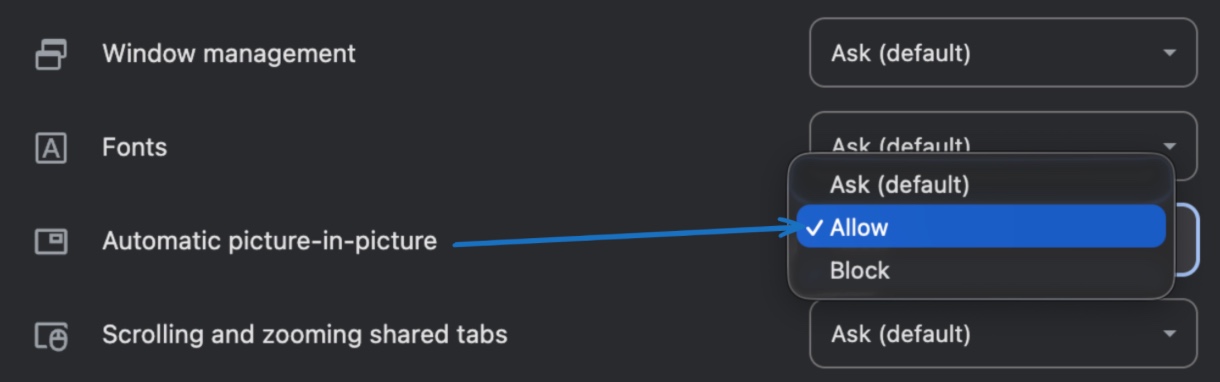
For Chromium-based browsers, Jitsi registers the MediaSession enterpictureinpicture action handler. The browser can invoke this handler when the user switches away from the meeting tab. This behavior remains subject to the browser's automatic-PiP permission and eligibility rules. Automatic Picture in Picture should be enabled for https://meet.jit.si/ site. A visibilitychange listener closes the Document PiP window when the user returns to the meeting tab.
For WebKit-based browsers, Jitsi uses Video PiP and the video element's webkitSetPresentationMode() method to switch between picture-in-picture and inline. This implementation was inspired by the AutoPiP Safari extension.
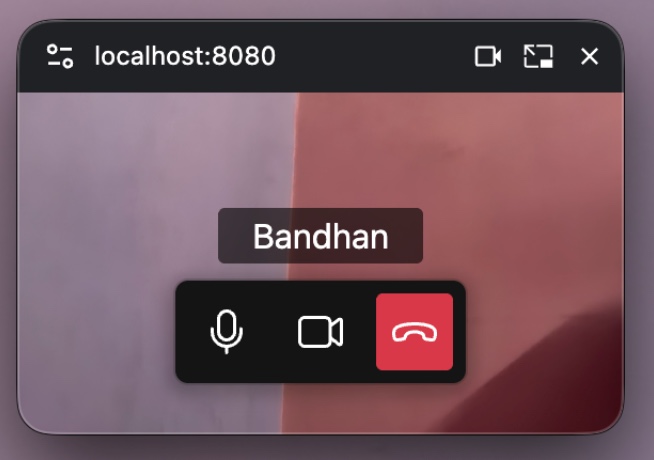
In standalone meetings, React's createPortal renders the PiP interface into the Document PiP window. The interface currently provides controls for muting or unmuting audio, enabling or disabling video, and leaving the meeting. These controls reuse existing Jitsi toolbar components and Redux actions.
The PiP window uses a compact layout that displays the current large-video participant. When the selected video is muted or unavailable, the participant's avatar and display name are shown.
The iframe constraint
Embedded meetings face an additional limitation: the Document PiP specification allows requestWindow() only from a top-level browsing context. A meeting running inside an iframe therefore cannot open the Document PiP window directly. This restriction is tracked in an open WICG issue.
To resolve this, the meeting iframe sends an internal request through the existing IFrame API transport. The embedding page then opens and manages the Document PiP window using a per-API controller and loads a dedicated React renderer into it.
Because a conference MediaStreamTrack cannot be passed directly between cross-origin browsing contexts, the iframe forwards the selected video through a native RTCPeerConnection. Signaling uses internal External API transport messages and does not introduce a new public API. The embedded media bridge currently transports only the selected video track; conference audio continues to play from the original meeting iframe.
Merged work
- #17450 — Auto-open Document PiP on tab switch + trigger button
- #17576 — Document PiP window content
- #17587 — Iframe Document PiP on tab switch
- #17694 — Gate browser PiP behind a configuration flag
- #17684 — Fix black screen in Video PiP
- #17711 — Add default fallback for browser PiP config
- #17712 — Fix development styling gap
- #17713 — Hide browser PiP trigger buttons in Electron
- #17721 — Show avatar on muted video in Safari PiP
Wrapping up
Jitsi Meet now supports an interactive Document PiP experience for standalone and embedded browser meetings, with Video PiP used as a fallback where supported. Users can keep the relevant participant visible, control their microphone and camera, and leave the meeting without returning to the main tab.
The feature becomes available when a deployment includes the merged changes and enables browser PiP using config pip.enableBrowserPiP.